Monday, July 14, 2025

Oracle database administration tools

Oracle database administration tools 

Oracle provides a variety of database administration tools designed to help Database Administrators (DBAs) manage, monitor, and optimize Oracle databases efficiently. Here are some of the key tools:

1. Oracle Enterprise Manager (OEM)

Oracle Enterprise Manager (OEM) is a comprehensive management tool that provides a web-based interface for managing Oracle databases. Key features include:

· Database Monitoring: Real-time monitoring of database performance, availability, and security.

· Performance Tuning: Tools like the Automatic Database Diagnostic Monitor (ADDM) and SQL Tuning Advisor.

· Configuration Management: Managing database configurations and changes.

· Backup and Recovery: Integrated with RMAN for backup and recovery operations.

· Job Scheduling: Automating administrative tasks through job scheduling.

· Reporting: Generating detailed reports on various aspects of the database.

2. Oracle SQL Developer

Oracle SQL Developer is a free integrated development environment (IDE) that simplifies the management of Oracle databases. It includes features like:

· Database Administration: Managing users, roles, and storage.

· SQL Development: Writing, debugging, and executing SQL and PL/SQL scripts.

· Data Modeling: Designing and managing database schemas.

· Data Migration: Tools for migrating data from other databases to Oracle.

3. Oracle Recovery Manager (RMAN)

Oracle Recovery Manager (RMAN) is a powerful tool for backup and recovery of Oracle databases. Key functionalities include:

· Automated Backup and Recovery: Simplifies and automates the backup and recovery process.

· Incremental Backups: Efficient backup strategies using incremental backups.

· Block-level Recovery: Recovering individual data blocks instead of entire files.

· Database Duplication: Creating duplicate copies of databases for testing and development.

4. Oracle Data Pump

Oracle Data Pump provides high-speed data movement between databases. It includes:

· Export (expdp): Exporting data and metadata from the database.

· Import (impdp): Importing data and metadata into the database.

· Network Mode: Direct data transfer between databases over a network.

5. SQL*Plus

SQL*Plus is a command-line tool for executing SQL and PL/SQL commands. It is useful for:

· Scripting: Automating tasks through SQL scripts.

· Interactive Queries: Running ad-hoc queries and updates.

· Database Management: Performing administrative tasks like startup and shutdown.

6. Oracle ASM (Automatic Storage Management)

Oracle ASM simplifies storage management by automating the placement and management of database files. Features include:

· Striping and Mirroring: Enhances performance and data redundancy.

· Disk Group Management: Simplifies the management of disk groups.

· Automatic Rebalance: Automatically redistributes data when disks are added or removed.

7. Oracle Real Application Testing (RAT)

Oracle Real Application Testing helps test the impact of database changes. It includes:

· Database Replay: Captures production workload and replays it on a test system.

· SQL Performance Analyzer: Analyzes the impact of changes on SQL performance.

8. Oracle Cloud Infrastructure (OCI) Console

For cloud-based databases, the OCI Console provides management tools for Oracle Cloud databases. Features include:

· Instance Management: Provisioning and managing Oracle Database instances in the cloud.

· Performance Monitoring: Monitoring cloud database performance and health.

· Backup and Recovery: Cloud-based backup and recovery solutions.

9. Oracle Universal Installer (OUI)

Oracle Universal Installer (OUI) is used for installing Oracle software. It includes:

· Installation: Guiding through the installation process of Oracle databases and related software.

· Configuration: Setting up initial configuration parameters.

10. Oracle Enterprise Manager Command Line Interface (EM CLI)

EM CLI allows for command-line interaction with Oracle Enterprise Manager, enabling scripting and automation of management tasks.


The architecture of Oracle Database 19c

 The architecture of Oracle Database 19c 

1. Database Instance

A database instance consists of the Oracle software running on a server and the memory structures and background processes that manage the database.

Memory Structures

System Global Area (SGA): A shared memory region that contains data and control information for the Oracle database. Key components of the SGA include:

o Database Buffer Cache: Stores copies of data blocks read from the data files.

o Shared Pool: Caches SQL statements, PL/SQL code, and data dictionary information.

o Redo Log Buffer: Stores redo entries that contain a log of changes made to the database.

o Large Pool: Used for large memory allocations, such as backup and restore operations.

o Java Pool: Used for all session-specific Java code and data within the database.

o Streams Pool: Used by Oracle Streams for data replication and capture.

Program Global Area (PGA): A memory region that contains data and control information for a single server process or background process. The PGA is private to each process.

Background Processes

· Database Writer (DBWn): Writes modified blocks from the database buffer cache to the data files.

· Log Writer (LGWR): Writes redo log entries from the redo log buffer to the online redo log files.

· Checkpoint (CKPT): Signals DBWn to write data to disk and updates the control file and data file headers with checkpoint information.

· System Monitor (SMON): Performs crash recovery when the instance is started after a failure.

· Process Monitor (PMON): Cleans up failed user processes and releases resources.

· Archiver (ARCn): Copies redo log files to the archive location when they are full.

· Recoverer (RECO): Resolves distributed transaction failures.

· Shared Server (Snnn): Handles multiple user processes in a shared server environment.

· Queue Monitor (QMNn): Manages Oracle Streams and Advanced Queuing.

2. Physical Database Structures

The physical storage structures of an Oracle database include:

· Data Files: Store the actual data of the database.

· Control Files: Contain metadata about the database, including the structure of the database and the locations of data files.

· Redo Log Files: Store a log of changes made to the database to enable recovery in case of a failure.

· Archive Log Files: Copies of redo log files that can be used for media recovery and to keep a history of changes.

3. Logical Database Structures

Oracle organizes data into logical structures to facilitate data management and access:

· Tablespaces: Logical storage units that group related data files together. Each tablespace can contain multiple segments.

· Segments: Set of extents allocated for a specific logical storage structure, such as a table or index.

· Extents: Contiguous blocks of storage within a tablespace.

· Data Blocks: The smallest unit of storage in an Oracle database, corresponding to a specific number of bytes of physical database space on disk.

4. Data Access Structures

· Tables: Store data in rows and columns.

· Indexes: Provide fast access to rows in a table.

· Views: Virtual tables based on the results of a query.

· Synonyms: Aliases for database objects, providing a layer of abstraction.

5. Networking and Interoperability

· Oracle Net: The network layer that allows communication between the Oracle database and client applications. It handles connections, authentication, and data transfer.

6. Oracle Managed Files (OMF)

Oracle Managed Files simplifies database file management by automating the creation and deletion of database files. With OMF, the DBA specifies file system locations, and Oracle automatically names and manages the files.

7. Multitenant Architecture

Oracle 19c supports the multitenant architecture, which allows multiple pluggable databases (PDBs) to be managed within a single container database (CDB). This architecture provides efficient resource management and isolation of different databases while allowing them to share the same instance and infrastructure.

Summary

The architecture of Oracle Database 19c is designed to support efficient data management, high availability, and robust security. By understanding these key components and their interactions, DBAs can effectively manage and optimize their Oracle database environments.

Roles and responsibilities of an Oracle DBA (Database Administrator)

 Roles and responsibilities of an Oracle DBA (Database Administrator) 


The roles and responsibilities of an Oracle DBA (Database Administrator) are extensive and varied, encompassing a wide range of technical and strategic tasks. Here is a detailed breakdown of their roles and responsibilities:

Installation and Configuration

· Database Software Installation: Installing Oracle database software on various operating systems.

· Configuration: Configuring databases for specific applications and business requirements, including setting up parameters and options.

Database Design and Architecture

· Schema Design: Designing database schemas, tables, indexes, views, sequences, and other database objects.

· Data Modeling: Working with data models and converting logical models into physical database designs.

Performance Tuning

· Query Optimization: Optimizing SQL queries for better performance.

· Resource Management: Managing system resources such as CPU, memory, and disk I/O to ensure optimal database performance.

· Performance Monitoring: Using Oracle tools like AWR (Automatic Workload Repository), ADDM (Automatic Database Diagnostic Monitor), and OEM (Oracle Enterprise Manager) to monitor and tune performance.

Backup and Recovery

· Backup Strategies: Developing and implementing backup strategies using RMAN (Recovery Manager) or other tools.

· Recovery Planning: Planning and executing database recovery procedures in case of failures or data corruption.

· Disaster Recovery: Setting up and managing disaster recovery solutions and ensuring data availability.

Security Management

· User Management: Creating and managing database users and roles, setting up permissions and access controls.

· Data Encryption: Implementing data encryption and other security measures to protect sensitive information.

· Compliance: Ensuring database security policies comply with regulatory requirements and standards.

Monitoring and Maintenance

· Routine Maintenance: Performing regular maintenance tasks such as database cleanup, reorganization, and updates.

· Health Checks: Conducting regular health checks to ensure the database is functioning properly.

· Patch Management: Applying patches and updates to the Oracle database software.

Troubleshooting

· Issue Diagnosis: Identifying and resolving database-related issues such as performance bottlenecks, connectivity problems, and data corruption.

· Log Analysis: Analyzing database logs to troubleshoot and diagnose issues.

Data Migration

· Data Transfer: Moving data between different databases or environments, often during upgrades or consolidations.

· Data Transformation: Transforming data as needed during migration processes.

Automation

· Scripting: Writing scripts to automate routine tasks such as backups, monitoring, and reporting.

· Tool Utilization: Utilizing Oracle tools and third-party software to streamline database management tasks.

Compliance and Auditing

· Audit Trails: Setting up and maintaining audit trails to track database activity.

· Regulatory Compliance: Ensuring the database environment meets regulatory and compliance standards.

Collaboration and Communication

· Cross-Functional Collaboration: Working closely with developers, system administrators, network administrators, and other stakeholders.

· Documentation: Maintaining detailed documentation of database configurations, procedures, and standards.

· Training and Support: Providing training and support to other team members and end-users.

Continuous Improvement

· Skill Development: Keeping up-to-date with the latest Oracle technologies and best practices.

· Process Improvement: Continuously seeking ways to improve database performance, reliability, and efficiency.

Oracle DBAs play a critical role in ensuring that an organization’s databases are secure, efficient, and reliable, supporting business applications and data-driven decision-making processes.

User Management in MYSQL

 User Management in MYSQL

Introduction:-

Effective user management is a critical aspect of MySQL database administration. Creating users and assigning access in MySQL involves creating, configuring, and maintaining user accounts to control access and permissions within the MySQL database system.

1. Connect to MySQL Server:

Open a command prompt or terminal.

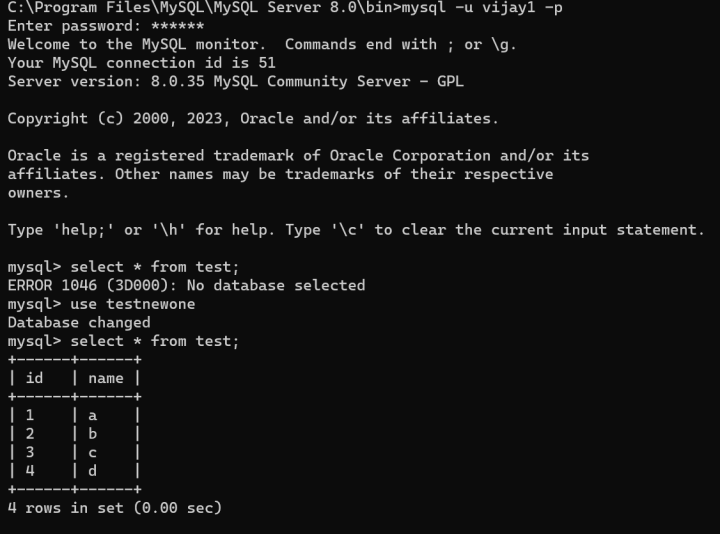
Use the mysql command to connect to the MySQL server:

mysql -u root –p


Replace root with your MySQL username if you're not using the root user.

2. Create a New User:

To create a new user, use the CREATE USER statement:

CREATE USER 'username'@'localhost' IDENTIFIED BY 'password';

Replace 'username' with the desired username, 'localhost' with the hostname or IP address of the user (e.g., '%' for any host), and 'password' with the user's password.


3. Grant Privileges:

To grant privileges to the user, use the GRANT statement:

 GRANT SELECT, INSERT, UPDATE, DELETE ON testnewone.* TO 'vijay1'@'localhost';

Replace 'database' with the name of the database to grant access to and adjust the list of privileges as needed.


Alternatively, to grant all privileges:


GRANT ALL PRIVILEGES ON testnewone.* TO 'vijay1'@'localhost';

4. Flush Privileges:

After granting privileges, use the FLUSH PRIVILEGES statement to apply the changes:

FLUSH PRIVILEGES;


5. View User Privileges:

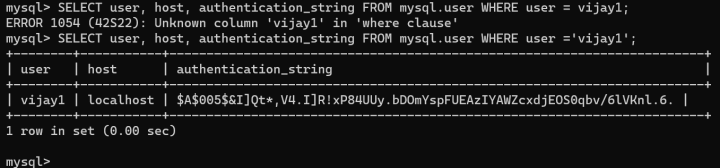
To view the privileges assigned to a user, you can query the mysql.user table:

SELECT user, host, authentication_string FROM mysql.user WHERE user = vijay1;


6. Exit MySQL:

After creating the user and assigning privileges, exit the MySQL shell:

EXIT;


Additional Considerations:

Wildcard Host ('%'):

If you want to allow the user to connect from any host, use '%' instead of a specific hostname or IP address in the CREATE USER statement.

Changing Password:

To change the password for a user, use the ALTER USER statement:

ALTER USER 'vijay1'@'localhost' IDENTIFIED BY 'vijay2';


Revoking Privileges:

To revoke privileges, use the REVOKE statement:

REVOKE ALL PRIVILEGES ON testnewone.* FROM 'vijay1'@'localhost';


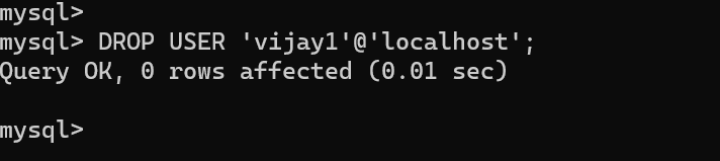
Deleting User:

To delete a user, use the DROP USER statement:

DROP USER 'vijay1'@'localhost';"


Conclusion:-

User management plays important role in MYSQL database management system.By understanding the principles of creating users, granting appropriate privileges, and managing authentication methods, database administrators can ensure the integrity and security of their MySQL databases.

Oracle Undo Tablespace management


UNDO TABLESPACE

USES:

· Rollback transactions.

· Recover the database.

· Provide read consistency.

How to monitor Undo Tablespace Usage:

In UNDO tablespace once we allocate the size, if that in currently used we cannot use the space in other process

To check the current size of the Undo tablespace:

Find undo tablespace current size in dba_tablespace view check the status as ONLINE to get current usage

SQL> select sum(a.bytes) as undo_size from v$datafile a, v$tablespace b, dba_tablespaces c where c.contents = 'UNDO' and c.status = 'ONLINE' and b.name = c.tablespace_name and a.ts# = b.ts#;

 UNDO_SIZE

----------

 775946240

To check the free space (unallocated) space within Undo tablespace:

The dba_free_space we will find tablespace free size mention the tablespace name to get free size of the tablesapce.

SQL> select sum(bytes)/1024/1024 "mb" from dba_free_space where tablespace_name ='UNDOTBS1';

        mb

----------

  718.4375


To Check the space available within the allocated Undo tablespace:

Undo tablespace allocated with the database to find that free space available in that use the dba_undo_segments and mention the status as expired to get available space in allocated undo tablesapce

SQL> select tablespace_name, sum(blocks)*8/(1024) reusable_space from dba_undo_extents where status='EXPIRED' group by tablespace_name;

TABLESPACE_NAME                REUSABLE_SPACE

------------------------------ --------------

UNDOTBS1                                 8.25


To Check the space allocated in the Undo tablespace:

Check currently space can be used by undo tablespace check the extents sattus as active and unexpired to get the used size

SQL> select tablespace_name , sum(blocks)*8/(1024) space_in_use from dba_undo_extents where status IN ('ACTIVE','UNEXPIRED') group by  tablespace_name;


TABLESPACE_NAME                SPACE_IN_USE

------------------------------ ------------

UNDOTBS1                            12.3125


Find over all undo tablespace status

Following script used to find overall undo tablesapce size usage and free space


SQL> select a.tablespace_name, SIZEMB, USAGEMB, (SIZEMB - USAGEMB) FREEMB

from (select sum(bytes) / 1024 / 1024 SIZEMB, b.tablespace_name

from dba_data_files a, dba_tablespaces b

where a.tablespace_name = b.tablespace_name

and b.contents = 'UNDO'

group by b.tablespace_name) a,

(select c.tablespace_name, sum(bytes) / 1024 / 1024 USAGEMB

from DBA_UNDO_EXTENTS c

where status <> 'EXPIRED'

group by c.tablespace_name) b

where a.tablespace_name = b.tablespace_name;

TABLESPACE_NAME                    SIZEMB    USAGEMB     FREEMB

------------------------------ ---------- ---------- ----------

UNDOTBS1                                 740    12.3125   727.6875


SQL>


Check undo usage by User or schema

select u.tablespace_name tablespace, s.username, u.status, sum(u.bytes)/1024/1024 sum_in_mb, count(u.segment_name) seg_cnts
from dba_undo_extents u, v$transaction t , v$session s
where u.segment_name = '_SYSSMU' || t.xidusn || '$' and t.addr = s.taddr
group by u.tablespace_name, s.username, u.status order by 1,2,3;


If undo tablesapce 100 % full ?


Undo tablespace 100 % full we cannot resize the table space size or we cannot add datafile to the tablespace if we add that file size also shown as 100 % full.

We create new tablespace then we assign the tablespace to default undo tablesapce

Once the process will be completed it will release the memory . if we also remove the used tablespace.


Beyond No-Code: How Oracle AI Agent Studio Uses MCP, Governance, and AI-Unit Monitoring to Build Production-Ready Industry Agents

  Beyond No-Code: How Oracle AI Agent Studio Uses MCP, Governance, and AI-Unit Monitoring to Build Production-Ready Industry Agents Recentl...